Checkpoints Latest →
Checkpoint 1 · Carousel fix pass

Carousel fix pass — six fixes from your screenshots, three calls to confirm

Today you sent three annotated phone screenshots of the Flashcard Carousel — the study game where you swipe through a stack of word cards — plus a report that tapping a grade button froze the screen for several seconds. All six issues you flagged are fixed and already live. Three of the fixes involved a judgment call; this page asks you to confirm or override each one with a single click.

6 fixes shipped today 3 one-click decisions All live on main
The story

Why we're here

You were using the Flashcard Carousel on your phone and hit four separate things that felt off: a form that ran off the bottom of the screen, ugly color-clashing tags at the top of each card, a freeze after grading a card, and a summary screen at the end that seemed to be reporting numbers that didn't match what you actually did. You sent three annotated screenshots and described the freeze in words.

We traced each one back to the actual code, fixed all six issues that came out of your report (one screenshot covered two separate problems), and shipped everything to the live app today. Three of the fixes required picking a specific number or a specific meaning for a label — those three are laid out below as one-click decisions so you can confirm we picked right, or tell us to change it.

Fix 1 of 6

The flag form used to run off the bottom of your screen

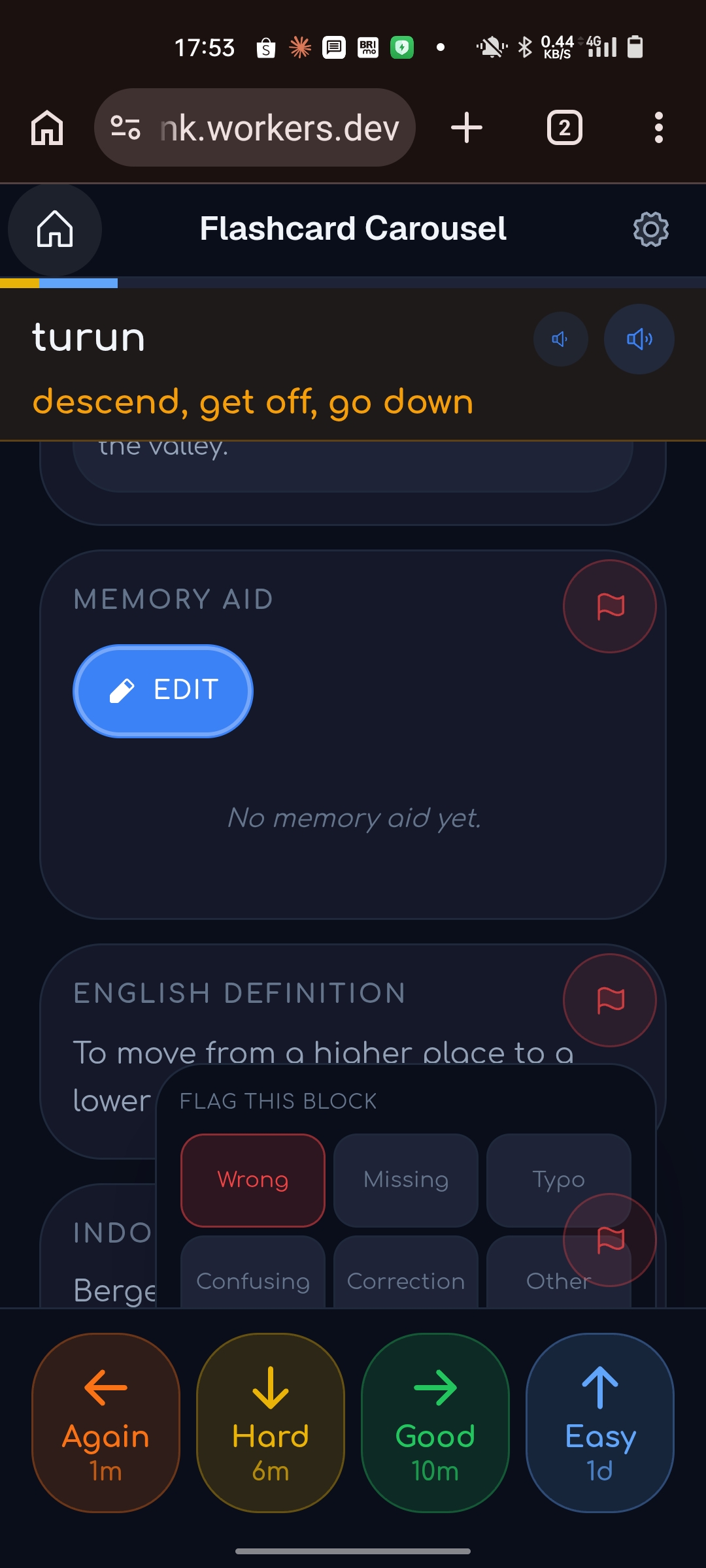
Every card has a small flag button so you can report a problem with it (wrong translation, bad example, broken audio, etc). Tapping it used to open a tiny pop-up box anchored to the card — and on a real phone, the grading bar at the bottom of the screen covered the bottom of that box, and other cards' flag icons showed through on top of it.

Before

Cut off, and stuff bleeding through

Before: flag report form cut off at the bottom of the screen, with other icons overlapping it
After

Full-screen sheet, nothing else visible
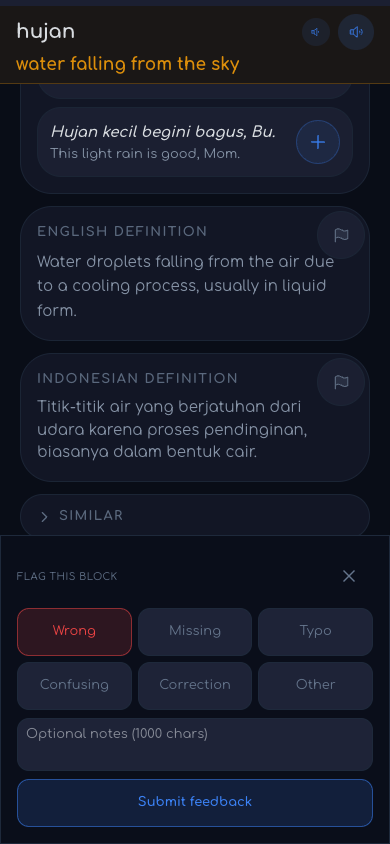
After: flag report form as a bottom sheet that fits fully on screen with a dimmed background

Now the form opens as a "bottom sheet" — a panel that slides up from the bottom and always fits fully on your screen, with everything behind it dimmed out so nothing else can show through. Tapping outside it, or pressing Esc on a keyboard, closes it. We also changed the little flag icon that sits on every card at rest: it used to be a bright red circle that looked like an alarm was going off, even when nothing was wrong. It's now a quiet gray icon, and only turns red once you actually pick "Wrong" as the problem type. Shipped in commit 8db07014.
Fix 2 of 6

The status tags at the top of a card were muddy and clashed with the app

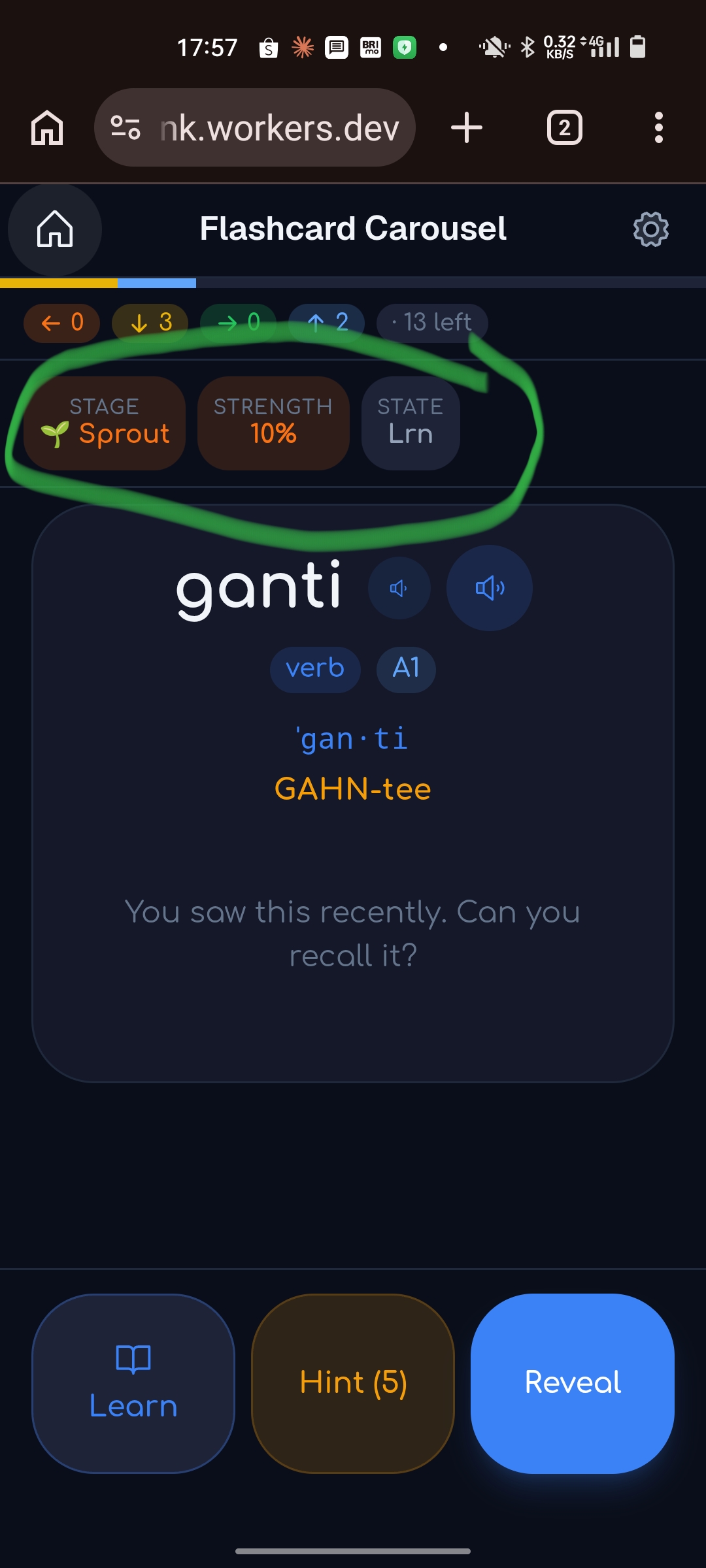
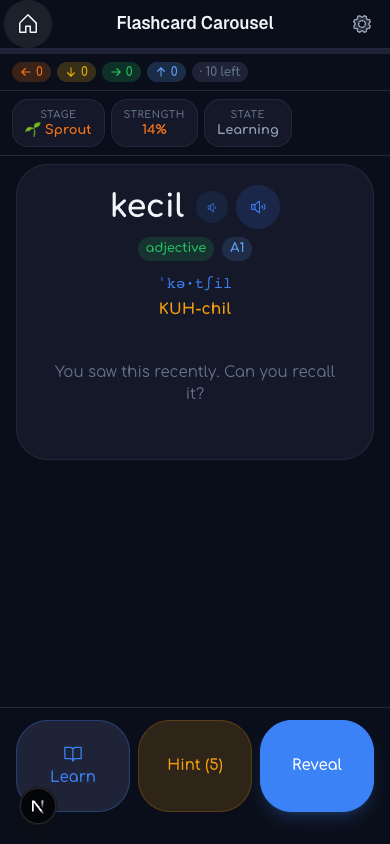
Every card shows three small tags at the top — its STAGE, STRENGTH, and STATE (whether it's brand-new, being learned, being reviewed, or being re-learned after a mistake). The tags were solid brown boxes with orange text that didn't match the app's blue/dark-slate look anywhere else, and one abbreviation ("Lrn") was hard to read at a glance.

Before

Brown boxes, orange text, "Lrn"

Before: status chips as solid brown boxes with orange text, abbreviation Lrn
After

Matches the app, full words

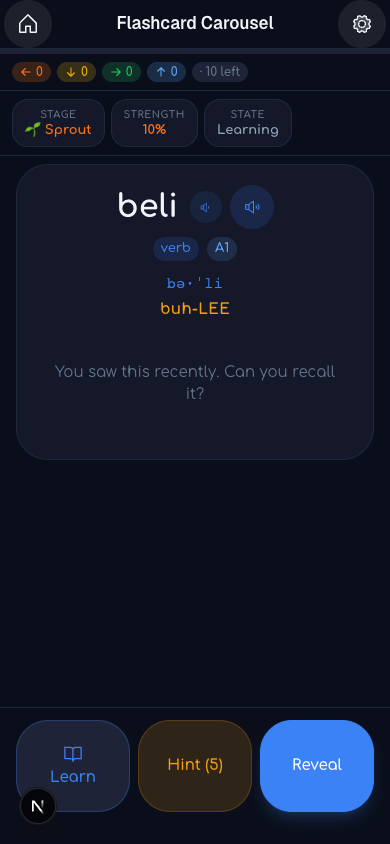
After: status chips on a dark slate surface matching the app, full words like Learning

The tags now sit on the same dark-slate surface as the rest of the card, with a subtle outline instead of a solid fill — only the value text itself carries a color. The state names are spelled out in full now: New, Learning, Review, Relearning, instead of abbreviations. This same fix automatically applies to the matching tags in every other study game in the app, not just the carousel, since they all share the same tag component. Shipped in commit 77447a0d.

Fix 3 of 6

Header icons didn't match each other

At the top of the screen there's a home button and a gear (settings) button. The home button sat inside a soft circle background; the gear button was bare, with no background at all — a small but noticeable mismatch.

Both buttons now use the same soft-circle background treatment. See the After: home and gear icons both with matching soft-circle backgrounds screenshot — also visible at the top of the "after" status-tag image above. Shipped in commit a31a1fc8.
Fix 4 of 6

Grading a card used to freeze the screen for 4–5 seconds

This was the freeze you reported: tap Again, Hard, Good, or Easy, and the app would just sit there — sometimes for 4 to 5 seconds — before showing you the next card.

What was actually happening: every time you graded a card, the app made a network call to save that grade to the server. The app was WAITING for that save to finish — and confirm it succeeded — before it would show you the next card, even though the next card was already sitting there, fully loaded and ready to display. On a slow or shaky connection, that save-and-confirm round trip could easily take several seconds, and the app just froze while it waited.

What changed: the app now shows you the next card immediately — we measured it at about 20 milliseconds, effectively instant — and the save to the server happens quietly in the background while you're already looking at the new card. If a save ever fails even after the app retries it a few times, you'll see a small toast message telling you so; nothing is silently lost. The one exception is the very last card of a session, which still waits briefly, because its result has to be handed off to build the summary screen right after. Shipped in commit 0f9c049f.

Fixes 5 & 6 of 6

The end-of-session summary was reporting wrong-looking numbers

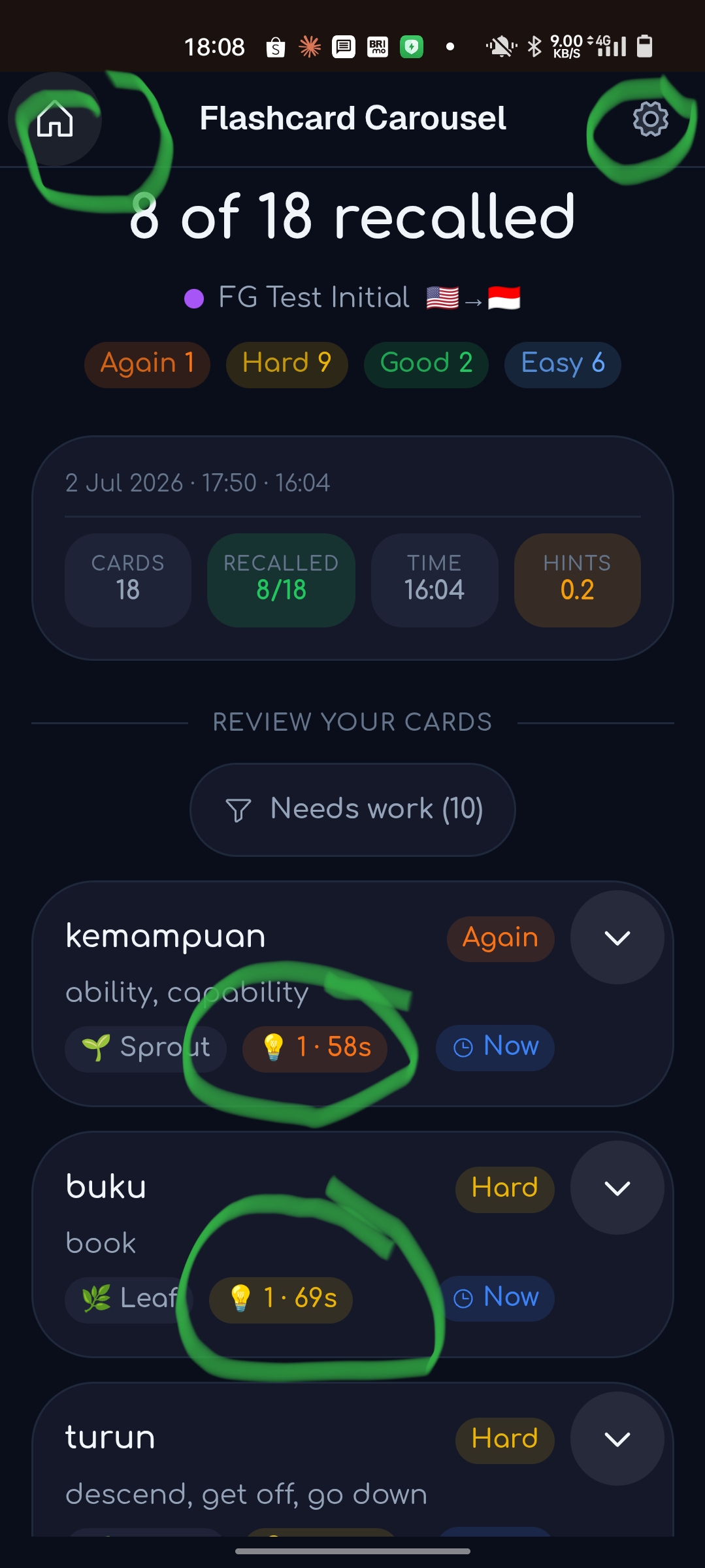
Your third screenshot was the session summary screen — the report you see after finishing a batch of cards. Two separate numbers on it looked wrong: the hint counts, and the total time.

Before

Hint counts and times both off

Before: session summary with hint count showing 1 regardless of hints actually viewed, and a HINTS 0.2 tile, plus inflated TIME and per-card seconds

There's no "after" screenshot for this one — the fix only shows up the next time you actually finish a real session, since a summary screen only exists after a session ends.

Fix 5 — hint counts were always "1," no matter how many hints you actually opened

Every card ships with its own pre-built pack of memory hints (the team calls this a "hint bundle"). Before today, the app only ever tracked a yes/no flag — did you open hints for this card at all, yes or no — because that yes/no flag is what actually matters for scoring: opening ANY hint costs you one grade level on that card, but looking at more hints after that costs nothing extra. The summary screen showed that yes/no flag as if it were a count, so every card that used hints showed "1," and a tile labeled just "HINTS 0.2" was actually an unlabeled average of that yes/no flag across the session.

Now the app also separately counts how many hints you actually viewed, card by card. Each card's row in the summary shows that real count, and the top-line HINTS tile shows the session total — how many hints you looked at in total across the whole session. The scoring rule itself did not change — using any hint still costs the same one grade level either way.

Fix 6 — the total time and per-card times included time you spent away from your phone

The TIME 16:04 and the 58s/69s per-card numbers in your screenshot included time you weren't actually looking at a card — time spent switching apps, or just holding the phone without touching it.

The app already had a clock that pauses when you leave the app entirely, but the carousel wasn't using it, and it had no way to detect "phone in your hand, screen on, but you're not touching anything." Now one shared activity detector drives every clock in the app: they pause the moment the app is hidden, AND after 45 seconds pass with no touch or keypress, resuming the instant you touch the screen again. This is a different thing from the 10-minute "Still there?" overlay (a design you already decided on earlier, called PLAN-164) — that overlay is unchanged and reads the same underlying activity signal, but the per-card clocks are always already paused long before 10 minutes would ever pass. The corrected times also feed into the scheduling engine's (FSRS's — the system that decides when a card comes back for review) "were you too slow answering this" check, and into what gets saved for each session.

Fixes 4, 5, and 6 all shipped in the same commit, 0f9c049f.

Decisions

3 calls we need from you

Each item names our recommendation. Pick an answer with one click, or add a note.

D1
D1 — How long you can hold the phone without touching it before the clocks pause
We picked 45 seconds. Normal thinking time on a single card rarely runs past 30 seconds, and 45 seconds is still far below the 10-minute mark where the "Still there?" overlay (PLAN-164, already decided) would step in. We recommend keeping 45s.
Decided by Frank
D2
D2 — What the top-line HINTS tile on the summary screen should report
We shipped it as the session total of hints viewed — how many hints you looked at, added up across every card. The other option would be a different number entirely: how many cards you used hints on at all, e.g. "4 of 18 cards." Both are legitimate; tell us which one you actually want to see.
Decided by Frank
D3
D3 — The on-screen TIME is fixed, but the number saved in the database is still the old kind
The TIME you see on screen now only counts active time, thanks to Fix 6 above. But the separate number that gets saved into the database for that session — the one used later for stats and streak history — is still computed on the server as plain wall-clock time (when the session started to when it closed), so it can still include away-time. Fixing that touches the data pipeline, which is a different team's territory (internally called "ENR"), so we didn't change it today. This asks whether we should file that follow-up request.
Decided by Frank
Also checked

Everything else was left alone on purpose

A few related things came up while chasing these fixes, and we deliberately left them untouched because nothing about them needed a decision: the 10-minute "Still there?" overlay's timing (PLAN-164) stayed at 10 minutes, the reason codes it can show stayed the same, and the rule that using any hint costs exactly one grade level (regardless of how many hints you view) also stayed exactly as it was. No review-pause items came up on any of those.