Checkpoint 1 · What shipped overnight

WordSense — what shipped overnight, and your picks

Three fixes are live, the C1 word band is two thirds done, and five things are yours to decide.

3 open picks 7 defaults to confirm C1 band 14/22 Reviewer: Frank
Checkpoints Latest →
Try this

Please try again on your phone

One walk-through, so I can confirm the two grade fixes above hold up in your hands.
1
Walk one family card end to end
Confirms the grade recorded correctly and coverage was written
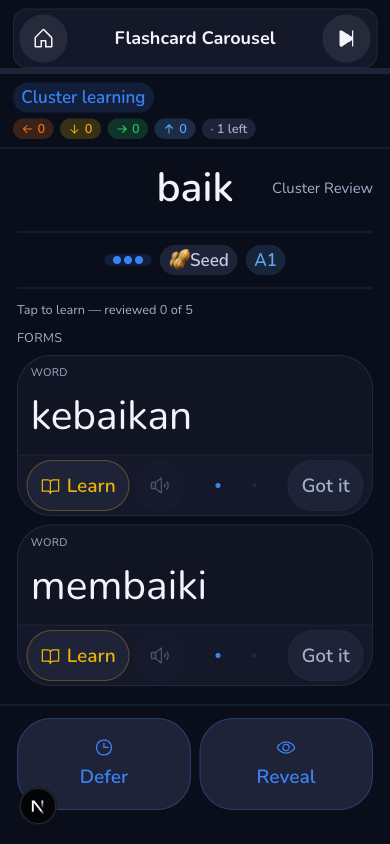
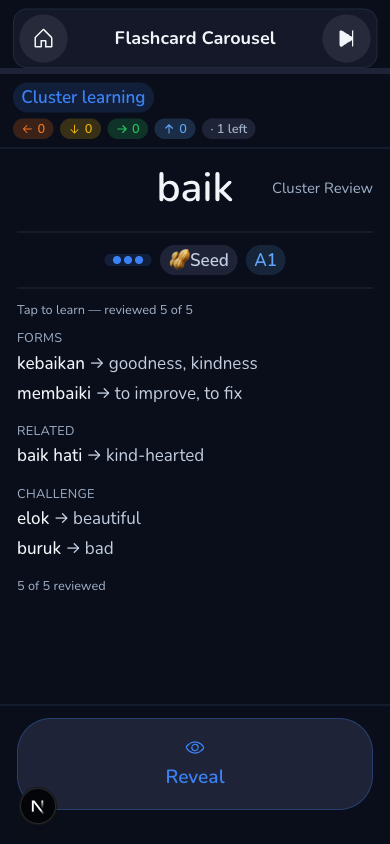
Do this Walk one family card end to end (a word at Plant or later, such as baik), tap Got it through the members, tap Reveal on the summary, grade it. I will read the row afterwards to confirm the grade recorded as tapped and the coverage was written.
mid-walk
mid-walk
end of family
end of family
Open picks

Three things only you can decide

Tap an answer on each row, add a note if you want.
1
PF-C1 — the new C1 words when the band finishes
The C1 word band is building new words behind the scenes as it runs. When it finishes, should those new words show up to learners right away, the same as the last band, or stay hidden until you've looked at a sample first?
2
QDC — author your three + words
You tapped + on three words overnight: dunia kita, apa saja, lagu kebangsaan. They're ready to build for about $0.09 total. (adalah and mungil already exist in the dictionary; the two full sentences you tapped are refused — they can't be authored as single words.)
3
LW — borrowed words (your loanword question)
You asked how the app should treat words borrowed straight from English. A small fix already shipped overnight — a list row now shows a "same word in English" hint on those words. The question is whether that's enough, or whether borrowed words deserve their own treatment.
Confirm or override

Built on my default — keep or change

Each of these already shipped with a default I picked. Say the word if you want it different.
4
CK — the member check button
Walking through a family of related words, each member now gets a plain "Got it" text button instead of a checkmark icon.
5
CL — the family-card marker
While you're inside a family walk-through, a small "Cluster learning" chip now sits at the left of the counters row so you always know you're in a multi-word flow.
6
EN — after the last member
Finish the last member of a family and a summary screen shows. Reveal is the only button — tapping it opens the word's own reveal.
7
DT — dots got smaller than the usual tap size
To keep the member row on one line the dot tap target went from 44 px to 32 px (still above the accessibility minimum of 24).
8
NV — a borrowed word in a list
A borrowed word showing up in a list (not mid-lesson) now carries a plain "same word in English" hint line instead of nothing.
9
LB — button label casing
Button labels across the app are now written in plain sentence case (e.g. "Add note"), keeping Title Case only for actual game names like Meaning Match.
10
LK — a Challenge word's Learn content
Tapping Learn on a Challenge word (like elok) now opens that word's own examples, grammar, pattern and pronunciation — matched to the right sense automatically, right when the word is dealt to you, by its gloss. If the word isn't in your dictionary yet, it says so plainly instead of showing nothing.
11
ALL — one-tap yes to everything above
Short on time? Pick the first option here and skip the other ten rows — it means every recommended pick and every live default above is fine as is.
Looking ahead

What happens next

After the band ends, the gate report lands, then PF-C1 decides the flip and QDC the authoring; the family-card re-test tells us whether the two grade fixes work in your hands; any change above ships in a small follow-up deploy.